How to Fix Error 77 on Prepaid Electricity Meters Starting with 2421 (CIU/Rimoti Meters) Jinsi ya kuondoa Error 77. If your prepaid electricity meter is showing ERROR 77, especially meters that start with the number 2421, don’t panic. This is a common issue on split prepaid meters, locally known as mita tengano, rimoti meters, or CIU meters installed on electric poles.
Jinsi ya kuondoa Error 77
In this guide, we explain what Error 77 means, what causes it, and step-by-step instructions on how to remove Error 77 and restore your electricity.
What Is Error 77 on a Prepaid Meter?
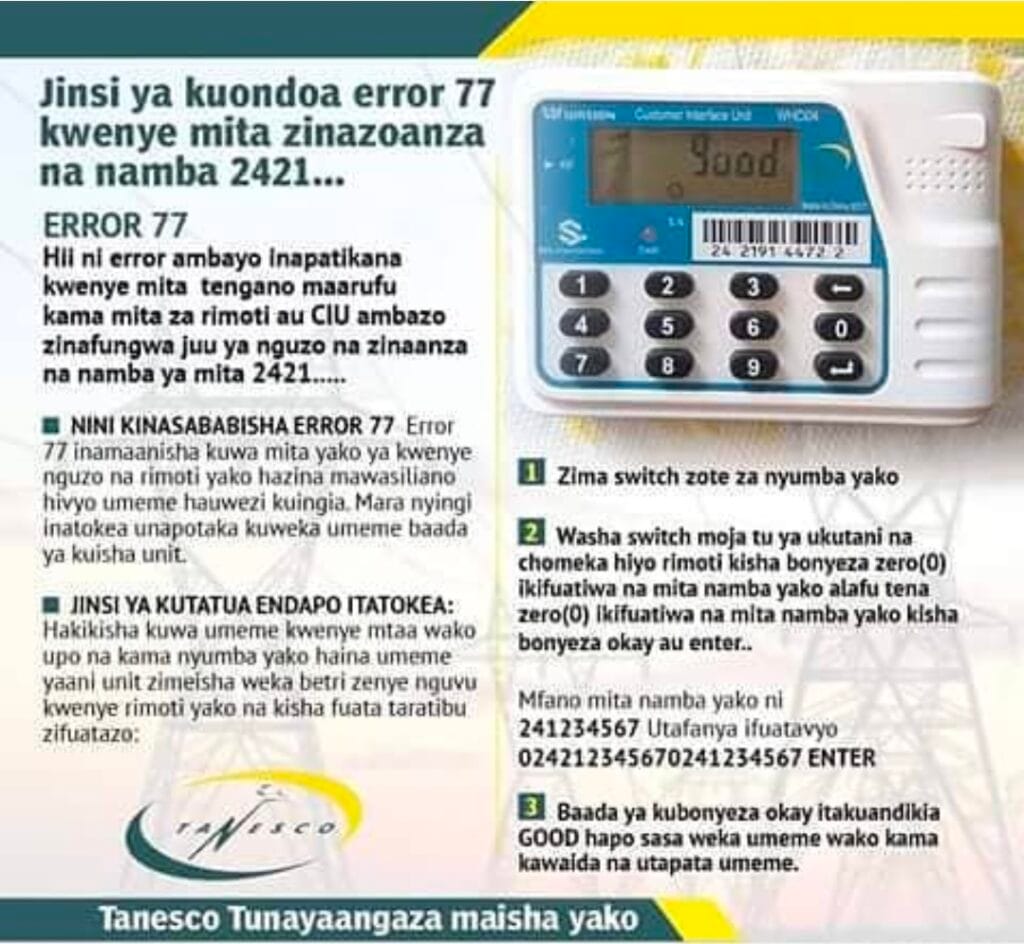
Error 77 is an error that occurs on split prepaid electricity meters (CIU/Rimoti), mostly those whose meter numbers start with 2421.
Meaning of Error 77
Error 77 means there is no communication between the meter installed on the pole and the CIU (remote) inside your house.
When this happens, electricity cannot flow, even if you try to load new units.
Common Causes of Error 77
Error 77 usually occurs due to the following reasons:

- Units have run out completely
- Weak or dead batteries in the CIU (rimoti)
- Temporary loss of communication between the pole meter and CIU
- Power interruptions in your area
- Internal switch issues inside the house
⚠️ Most users experience Error 77 when trying to load electricity after units are finished.
How to Fix Error 77 on Meters Starting with 2421
Follow these steps carefully and in order to solve the problem.
Step 1: Confirm Power Availability
- Make sure electricity is available in your street
- If neighbors have power, proceed to the next step
Step 2: Replace CIU Batteries
- Insert new, strong batteries into your CIU (rimoti)
- Weak batteries are the most common cause of Error 77
Step 3: Turn Off All Switches
- Switch OFF all electrical switches in your house
Step 4: Turn On One Wall Switch
- Turn ON only one wall switch
- Plug in the CIU (rimoti)
Step 5: Enter the Error 77 Reset Code
On the CIU keypad, press:
0 + Meter Number + 0 + Meter Number + ENTER
Example:
If your meter number is 241234567, enter:
02412345670241234567 ENTER
After pressing ENTER / OK, the CIU should display GOOD
Step 6: Load Your Electricity Units
- Once you see GOOD, load your electricity tokens normally
- Electricity should now be restored successfully
Important Notes
- This method works specifically for split meters (CIU/Rimoti)
- Common meter numbers affected start with 2421
- If GOOD does not appear, repeat the steps carefully
- If the issue persists, contact TANESCO customer service
Frequently Asked Questions (FAQs)
Does Error 77 mean my meter is damaged?
- No. Error 77 usually means communication loss, not meter damage.
Can I fix Error 77 without calling a technician?
- Yes. In most cases, battery replacement and correct code entry solve the problem.
Does Error 77 affect all prepaid meters?
- No. It mainly affects split prepaid meters (CIU) installed on poles.
Conclusion
Error 77 on prepaid meters starting with 2421 is a common and fixable issue.
By replacing CIU batteries and entering the correct reset sequence, you can restore electricity without waiting for a technician.
Save this guide or share it with others who may face the same problem.