Your Guide to Checking the 2026 NECO SSCE External Results. The results for the 2026 NECO SSCE External (GCE) examination are now available online. If you’re one of the many candidates eagerly waiting to check your performance, this step-by-step guide will walk you through the official process to access your results quickly and securely.
How to Check 2026 NECO SSCE External Results
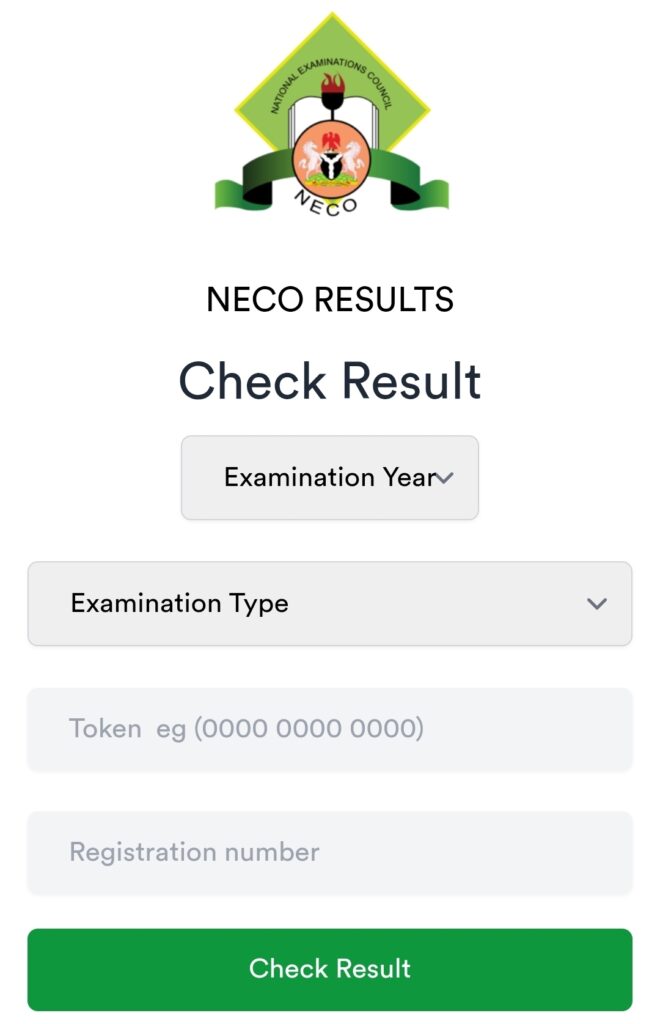
Before you begin, make sure you have two key things ready: your unique 12-digit Result Checking Token and your 10-digit NECO Registration Number. Once you have these, follow these simple steps:
Go to the Official NECO Portal: Open your web browser and visit the official NECO result-checking website at
www.result.neco.gov.ng.Select Your Exam Details: On the portal’s homepage:
Choose “2026” as your Examination Year.
Select “SSCE External” as your Exam Type. This is the correct option for all private (GCE) candidates.
Enter Your Credentials:
Input your NECO Registration Number (e.g., 92566498GA).
Input the 12-digit Token you purchased.
View Your Result: Click the “Check Result” button. Your complete result will load on the screen. You can then print it or save it as a PDF for future use.
To make it even clearer, here is a visual breakdown of the four main steps to access your results on the official portal:

How to Purchase a Result Checking Token
A token is mandatory to check your NECO result. Here’s how to purchase one directly from the NECO portal:
On the official result portal (
www.result.neco.gov.ng), look for the option to “Buy Token” or “Create Account”. You will need to register an account using your email address.After logging in, you can proceed to purchase a token. The payment is typically made through the Remita payment platform.
Upon successful payment, the token will be displayed in your account dashboard and sent to your registered email.
Important Tip: Always purchase tokens only from the official NECO portal or accredited vendors to avoid scams and invalid codes. Third-party websites may not be reliable.
Troubleshooting Common Issues
If you run into problems, here are quick solutions for the most common issues:
| Problem | Likely Cause & Solution |
|---|---|
| Invalid Token | The token may be incorrect, already used, or from an unofficial source. Ensure you enter the 12-digit number correctly and purchase from the official portal. |
| Incorrect Exam Number | Double-check the 10-digit alphanumeric number on your exam slip. An error here will prevent access. |
| Result Not Found | Verify that you selected the correct Exam Year (2026) and Exam Type (SSCE External). |
| “Result Withheld” | This is an official action by NECO. You should contact your examination center or NECO support directly for guidance. |
| Poor Internet Connection | A stable connection is required. Try again with a better network or switch devices. |
Key Information for 2026 Candidates
Token Validity: One token can be used to check your result up to five (5) times. If you need to check more than that, you will have to use the NECO e-Verify platform for subsequent checks.
Official Links: The main NECO website is
www.neco.gov.ng, but the dedicated result portal iswww.result.neco.gov.ng. Always use these official links for security.Next Steps: After checking, print multiple copies of your result. You will need it for university admission (via JAMB CAPS, direct entry, or post-UTME), NYSC registration, and job applications.
Checking your result is the first step toward your next big achievement. Take a deep breath, follow the steps carefully, and best of luck.