Konami Login Register: Step-by-Step Guide to Create and Access Your KONAMI ID. A KONAMI ID is an account used to access online services provided by the gaming company Konami. It allows players to connect their accounts across different games and platforms such as eFootball (PES), Yu-Gi-Oh! Master Duel, Metal Gear, and other Konami services.
If you want to play online, transfer game data, or manage your account, you will need to complete the Konami login or register process. This guide explains how to create a KONAMI ID, how to log in, and how to fix common login issues.
What Is a KONAMI ID?
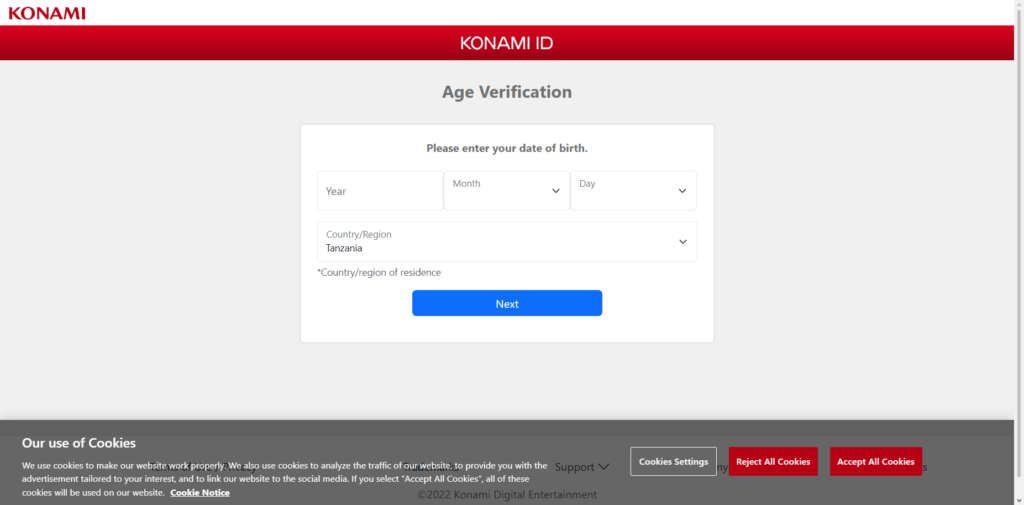
A KONAMI ID is a personal account used to access Konami’s online services. It connects your game data to Konami servers and allows you to manage your profile, security settings, and linked games.
With a KONAMI ID you can:
- Play Konami games online
- Transfer game data between devices
- Link accounts for games like eFootball and Yu-Gi-Oh
- Manage account information
- Use security features like OTP authentication
The account is free to create and can be used across multiple Konami games.
Konami Login Register Portal
You can access the official Konami account system through the My KONAMI portal.
Login page
https://my.konami.net/login.do
From this portal you can sign in, manage your account information, or register a new KONAMI ID.
Step-by-Step Guide to KONAMI Login
Follow these steps to log in to your KONAMI account.
Step 1 Open the KONAMI Login Page
Go to the official login portal:
https://my.konami.net/login.do
Step 2 Enter Your KONAMI ID
Type your KONAMI ID or registered email address in the login field.
Step 3 Enter Your Password
Enter your account password carefully.
Make sure Caps Lock is not enabled.
Step 4 Click the Login Button
Click Login to access your account.
Step 5 Access Your Account Dashboard
Once logged in, you can manage your account settings, view linked games, and update personal information.
How to Register a KONAMI ID
If you do not have a KONAMI ID, you must create an account before logging in.
Follow these steps to register.
Step 1 Visit the Registration Page
Go to the official registration page:
https://my.konami.net/registration/mailAddressEntry.html
Step 2 Enter Your Email Address
Provide a valid email address where Konami can send a verification message.
Step 3 Verify Your Email
Check your inbox and click the verification link sent by Konami.
Step 4 Fill in Account Information
Enter the required details such as:
- Country or region
- Date of birth
- Username
- Password
Step 5 Confirm Registration
Submit the registration form to create your KONAMI ID.
Once registration is complete, you can log in using your new account.
How to Link KONAMI ID to Games
Many Konami games allow you to link your KONAMI ID to save game progress.
Example for eFootball / PES games:
- Open the game settings
- Select Online Settings
- Choose Link KONAMI ID
- Scan the QR code or log in using your KONAMI account
After linking, your game data will be connected to your KONAMI ID.
How to Reset KONAMI Password
If you forget your password, you can reset it through the KONAMI account system.
Step 1 Go to the Password Reset Page
Visit the KONAMI login page.
Step 2 Click “Reissue Password”
Select the password reset option.
Step 3 Enter Your Email Address
Provide the email linked to your KONAMI ID.
Step 4 Check Your Email
You will receive instructions to reset your password.
Step 5 Create a New Password
Follow the instructions and set a new password.
After resetting, you can log in again.
Common KONAMI Login Problems
Some users report issues when trying to log in.
Common problems include:
- Incorrect KONAMI ID or password
- Account not verified
- Server connection issues
- Browser compatibility problems
Most login issues can be solved quickly.
Troubleshooting KONAMI Login Issues
If you cannot log in, try these solutions.
- Check that your email and password are correct
- Make sure your account email is verified
- Refresh the login page and try again
- Clear your browser cache and cookies
- Try logging in using another browser or device
If the issue continues, contact Konami support.
Benefits of Using a KONAMI ID
Creating a KONAMI account offers several advantages.
Data Transfer Between Devices
Your game progress can be transferred between devices.
Account Security
The platform supports security features like OTP authentication.
Game Integration
One account can be used across multiple Konami games.
Online Features
Access multiplayer services and online events.
Final Thoughts
The Konami login register system allows players to manage their gaming accounts and access online features across Konami titles. Creating a KONAMI ID is simple and provides benefits such as data transfer, security protection, and access to online game services.
By following the step-by-step login and registration instructions in this guide, users can easily create their KONAMI account and start using Konami’s online gaming services.