If you are searching for GDE unemployed educators register information, this guide will help you understand how to create your profile on the Gauteng Department of Education Unemployed Educators Database. The system is designed to help unemployed educators register their details online and apply for teaching vacancies advertised by schools in Gauteng.
The registration process is simple, but you must make sure all your details are entered correctly. Once registered, you can log in, update your profile, and apply for available educator posts.
What Is GDE Unemployed Educators Register?
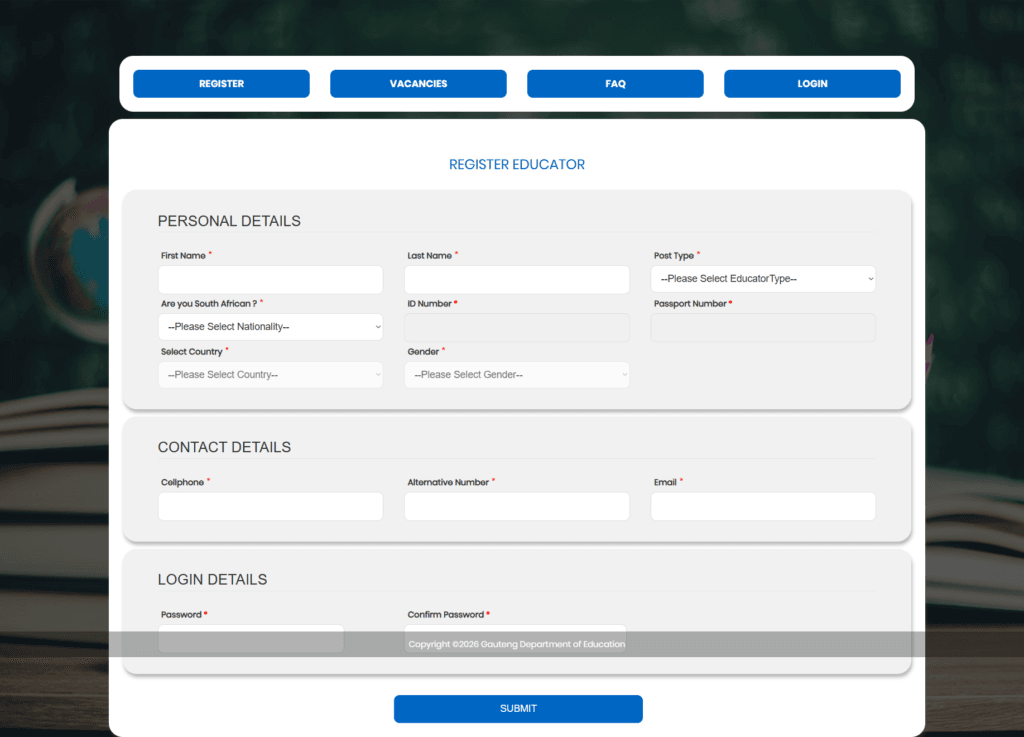
The GDE unemployed educators register process allows unemployed teachers and educators to capture their personal details on the Gauteng Department of Education database. This online system is used to manage educator information and provide access to teaching vacancies.
After successful registration, applicants can:
- Create an educator profile
- Update their personal and contact details
- View available vacancies
- Apply for teaching posts online
How to Complete GDE Unemployed Educators Register
To complete the GDE unemployed educators register process, you need to fill in the registration form with the correct information.
More Read
Personal Details
In the personal details section, you will be asked to provide:
- First Name – Enter your official first name exactly as it appears on your identification document.
- Last Name – Type your surname or family name correctly.
- Post Type – Select the correct educator type from the drop-down menu. Make sure you choose the right option because it may affect the vacancies you can apply for.
- Are You South African? – Choose whether you are South African or not. This determines whether you will use an ID number or passport number.
- ID Number – If you are South African, enter your valid ID number.
- Passport Number – If you are not South African, enter your passport number where required.
- Select Country – Choose your country from the list provided.
- Gender – Select your gender from the available options.
Contact Details
The contact details section is important because it helps the department communicate with you.
- Cellphone – Enter your active cellphone number.
- Alternative Number – Provide another phone number if available.
- Email – Enter a valid email address that you can access easily.
Login Details
To finish the GDE unemployed educators register process, you will need to create login credentials.
- Password – Choose a strong password for your account.
- Confirm Password – Type the same password again to confirm it.
Make sure both passwords match before submitting the form.
Here is official link for GDE Unemployed Educators Register: https://unemployededucators.gauteng.gov.za/Account/RegisterUser.aspx
Important Tips Before You Submit
Before completing your registration, make sure you:
- Use your real names as they appear on official documents
- Enter the correct ID number or passport number
- Use an active cellphone number and email address
- Select the right post type
- Create a password you can remember
- Review all details before submitting
Common Mistakes to Avoid
Many applicants fail to complete the GDE unemployed educators register process properly because of small errors. Avoid these common mistakes:
- Entering the wrong ID number
- Using an invalid email address
- Selecting the wrong educator type
- Leaving required fields empty
- Entering different passwords in the password fields
Why GDE Unemployed Educators Register Is Important
The GDE unemployed educators register system helps unemployed educators stay ready for new opportunities. Without registration, you may not be able to apply for teaching vacancies advertised through the platform.
Keeping your profile complete and updated can improve your chances of applying successfully when new posts become available.
Conclusion
The GDE unemployed educators register process is the first step for educators who want to apply for teaching posts in Gauteng. By filling in your personal details, contact details, and login details correctly, you can create your account and start applying for vacancies online.
Make sure you double-check every section before submitting your registration. A complete and accurate profile will help you avoid delays and improve your chances of accessing available teaching opportunities.