GDE Unemployed Educators Login: How to Sign In, Reset Password, and Apply Online. If you are searching for GDE unemployed educators login, this guide explains how to sign in to the Gauteng Department of Education Unemployed Educators portal, what you need before logging in, and how to fix common login problems. The official portal includes tabs for Register, Vacancies, FAQ, and Login, and the login page asks for your ID Number and Password.
- What Is GDE Unemployed Educators Login?
- Official GDE Unemployed Educators Login Link
- How to Use GDE Unemployed Educators Login
- What You Can Do After Login
- Forgot Your Password? Here Is How to Reset It
- Who Can Register on the GDE Unemployed Educators Portal?
- Common GDE Unemployed Educators Login Problems
- What to Do If the Portal Is Not Working
- Important Warning for Applicants
- Final Thoughts
The GDE Unemployed Educators portal allows unemployed educators to register their details, check school vacancies, and apply for available teaching posts online. The website is accessible through the official Gauteng Department of Education unemployment educators platform.
What Is GDE Unemployed Educators Login?
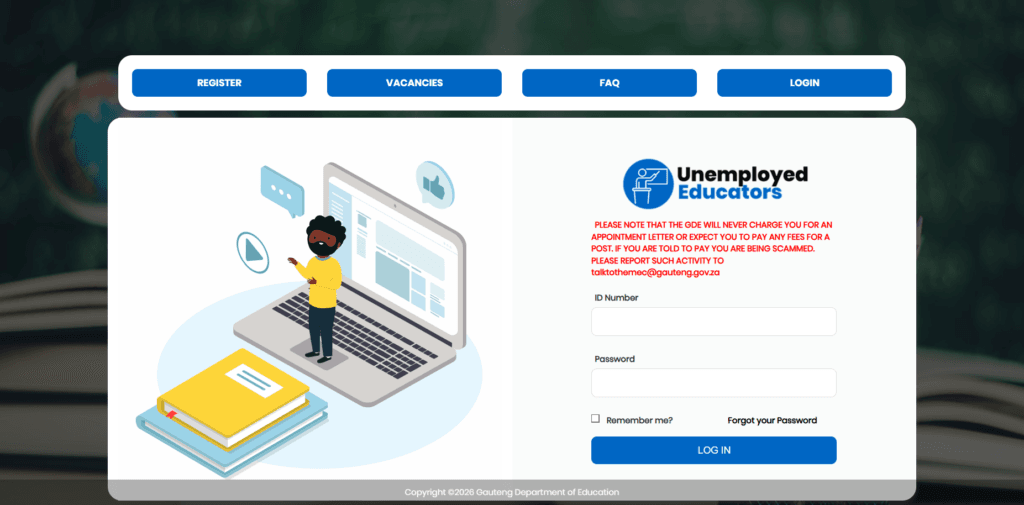
The GDE unemployed educators login is the sign-in section of the Gauteng Department of Education’s online recruitment portal for unemployed educators. After registering, users can log in to manage their profile, check available vacancies, and submit applications for teaching posts in Gauteng schools.
On the official login page, applicants are required to enter:
- ID Number
- Password
- Optional Remember me selection
Official GDE Unemployed Educators Login Link
To access the login page, use the official Gauteng Department of Education unemployed educators portal:
unemployededucators.gauteng.gov.za. The site includes separate pages for registration, vacancies, FAQ help, and login.
How to Use GDE Unemployed Educators Login
Follow these steps to sign in successfully:
Step 1: Visit the Official Portal
Open the Gauteng Department of Education Unemployed Educators website and click on the Login tab: https://unemployededucators.gauteng.gov.za/Logins.aspx
Step 2: Enter Your ID Number
On the login page, type your ID Number in the username field. The portal’s password recovery page also refers to the username as ID Number, confirming that this is the key login identifier.
Step 3: Enter Your Password
Type the password you created during registration. The registration page states that passwords must be at least 8 characters and include a mix of numbers, special characters, uppercase, and lowercase letters.
Step 4: Click Login
After entering the correct details, click Login to access your profile and start checking vacancies or submitting applications.
What You Can Do After Login
Once you access your account, you can use the system to:
- View your educator profile
- Update your details
- Check current teaching vacancies
- Apply for advertised posts online
The vacancies page shows school names, districts, learning areas, and closing dates for advertised posts.
Forgot Your Password? Here Is How to Reset It
If you cannot log in, the official FAQ says you should:
- Click the Login tab
- Click Forgot your Password
- Enter your Username (ID Number)
- Click Retrieve Profile
- Enter a new password
- Repeat the new password
- Click Change Password
This same process is listed by the portal for users who already exist on the system and for users who cannot log into the system.
Who Can Register on the GDE Unemployed Educators Portal?
The registration form asks applicants for personal and contact details such as:
- First name and last name
- Date of birth
- Gender
- Country
- ID or passport
- Post type
- Cellphone number
- Email address
- Home address
- Password and confirm password
The portal also includes a question on whether the applicant is South African and allows non-South Africans to use passport details where required.
Common GDE Unemployed Educators Login Problems
Many users experience login issues because of simple mistakes. Common problems include:
- Entering the wrong ID Number
- Using the wrong password
- Not completing registration properly
- Forgetting the password
- Using a cellphone number already linked to another account during registration
The registration page also notes that the alternative cellphone number must not be the same as the primary cellphone number, and that a cellphone number already in use will trigger an error.
What to Do If the Portal Is Not Working
If you experience technical problems, the FAQ page says applicants should refer to the FAQ tab for help. It also states that if you cannot receive an OTP or cannot edit information on the system, you should email [email protected].
Important Warning for Applicants
The portal displays a warning that the GDE will never charge you for an appointment letter or expect you to pay any fees for a post. If anyone asks you to pay, the site says you may be dealing with a scam and should report it to [email protected].
Final Thoughts
The GDE unemployed educators login portal is an important system for unemployed educators who want to register, sign in, and apply for teaching jobs online in Gauteng. To avoid delays, make sure you use the correct ID Number, keep your profile updated, and check the Vacancies section regularly. The official site also offers password reset support and FAQ guidance for common technical issues.